Vous n'êtes pas connecté : vous pouvez uniquement poster dans Aide & Conseils


Lasco7409
Membres
-
Inscription
-
Dernière visite
-
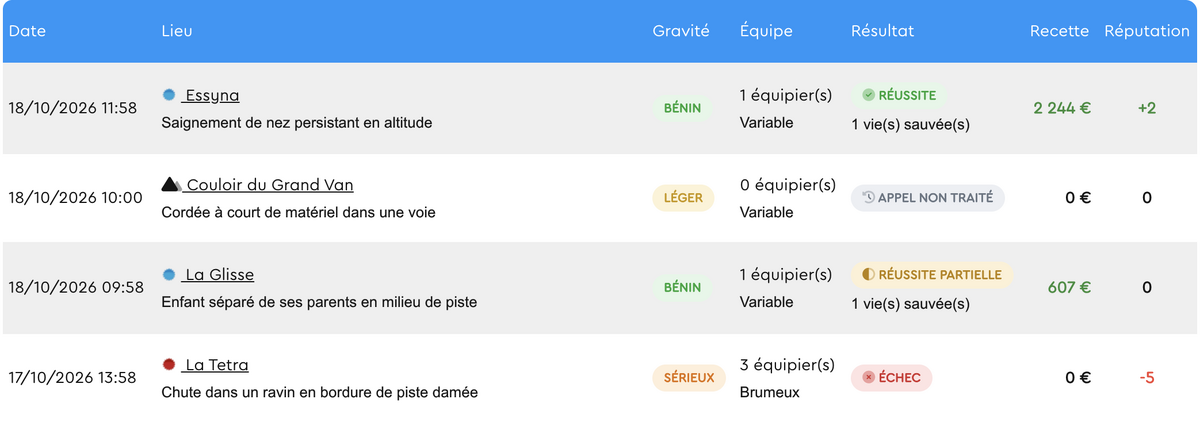
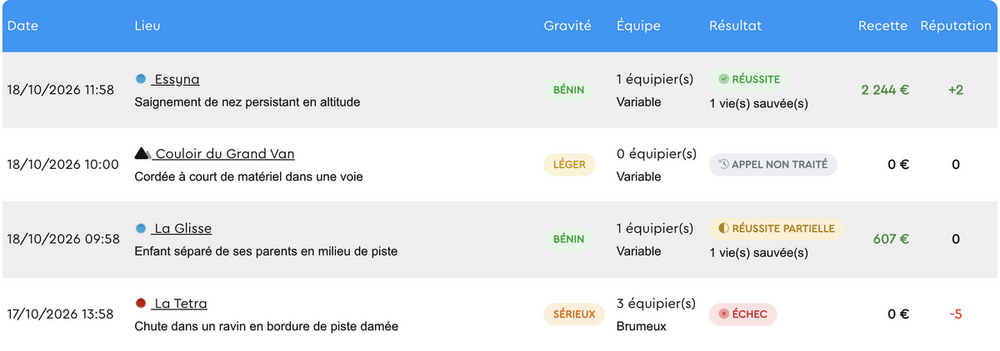
Bonjour, Je souhaiterais avoir une information concernant l'historique de nos sauvetages à la fin de chaque mission. En effet, sur cette historique, il est possible de retrouver le détail de chaque mission. Il m'arrive des fois qu'il soit écrit "Réussite partielle" ou même "Échec". Le problème est que l'on ne sait pas pour quelle raison, la mission a échoué. Pourriez-vous m'éclairer sur l'origine de ces réussites partielles/échecs. Merci d'avance
-
Plus de peur que de mal
-
Lasco7409 a modifié sa photo de profil
-
Bonjour, j'imagine que vous avez reçu beaucoup de messages comme celui-ci mais malgré une recherche assez poussé, je ne comprends toujours pas purquoi je ne reçois aucun gain sur les restaurants, les hôtels, les parking et les transports. Pourriez-vous m'aider à mieux comprendre ceci ? Merci d'avance 😊